
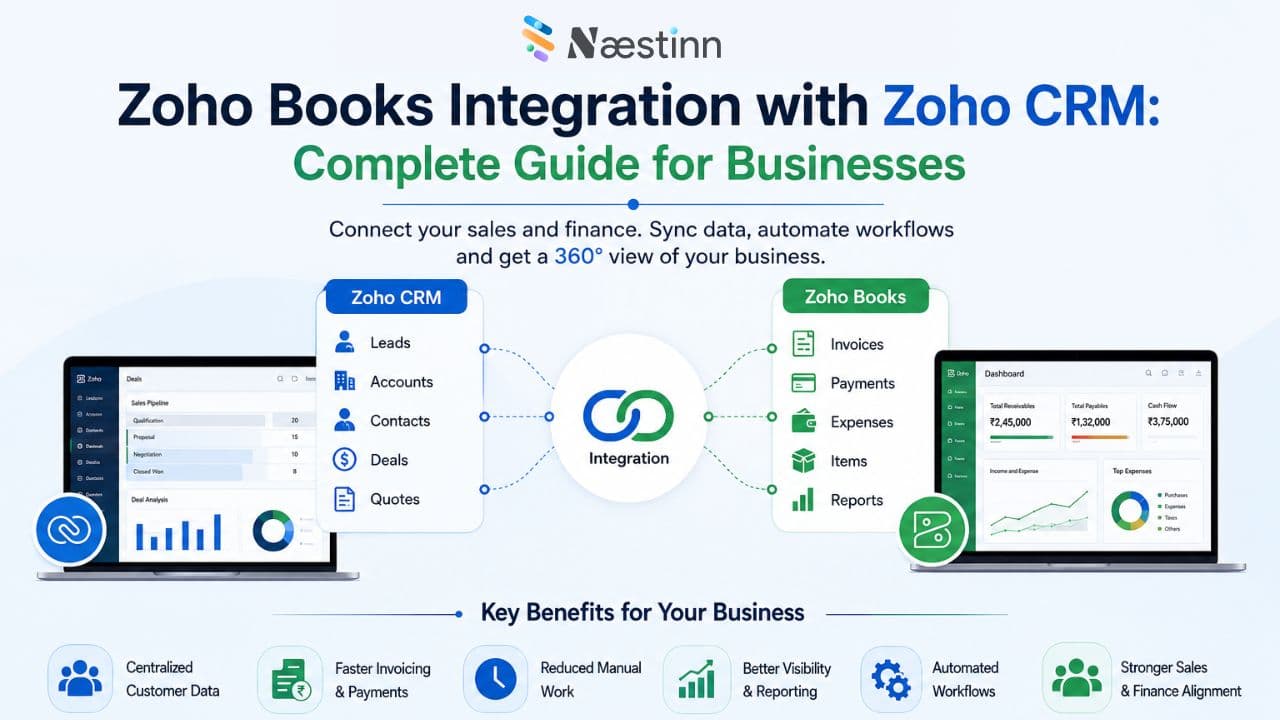
Sales and finance teams often work with different systems.
The sales team may use a CRM to manage leads, contacts, deals, and customers, while the finance team uses accounting software to manage invoices, payments, expenses, and receivables.
When these systems operate separately, businesses often end up entering the same information multiple times.
For example, after a salesperson closes a deal, the finance team may need to manually create a customer and invoice in the accounting system.
This can result in:
-
Duplicate data entry
-
Human errors
-
Delayed invoicing
-
Inconsistent customer information
-
Poor visibility between sales and finance
What Is Zoho Books Integration with Zoho CRM?
Zoho CRM is primarily used to manage customer relationships and sales activities, while Zoho Books is designed for accounting and financial management.
Integrating the two systems allows relevant customer and sales information to flow between CRM and accounting processes.
For example:
Lead → Contact → Deal → Customer → Invoice → Payment
Instead of manually transferring information between systems, businesses can create a more connected workflow.
Why Integrate Zoho CRM with Zoho Books?
The main reason businesses integrate the two platforms is to connect sales and finance operations.
Without integration:
Sales Team → Zoho CRM
Finance Team → Zoho Books
Manual Data Transfer → More Work
With integration:
Sales → Zoho CRM → Zoho Books → Invoice → Payment
This creates a more connected customer lifecycle.
Key Benefits of Zoho CRM and Zoho Books Integration
1. Eliminate Duplicate Data Entry
One of the biggest benefits is reducing repetitive data entry.
Customer information captured in Zoho CRM can be used within the connected Zoho Books workflow, reducing the need for finance teams to manually recreate records.
This can save time and reduce data-entry errors.
2. Faster Invoicing
Once a deal is successfully closed, the business can move the process toward invoicing without manually recreating all the customer information.
This can help finance teams:
-
Create invoices faster
-
Reduce administrative work
-
Improve billing turnaround
-
Get invoices to customers sooner
3. Better Visibility for Sales Teams
Sales representatives don't always need to wait for the finance team to provide an update.
Depending on the integration and configuration, relevant financial information can be made available within the CRM workflow.
Sales teams can gain better visibility into information such as:
-
Customer invoices
-
Payment status
-
Outstanding balances
-
Transaction history
This helps salespeople have more informed customer conversations.
4. Better Customer Experience
Imagine a customer contacts your sales representative asking:
"Has my invoice been paid?"
Instead of contacting the finance team and waiting for an answer, the salesperson can access relevant information through the connected system, depending on the configured permissions and integration.
This can improve response times and customer experience.
5. Connect Sales and Finance Teams
Sales and finance often have different priorities.
Sales focuses on:
-
Leads
-
Opportunities
-
Deals
-
Revenue
Finance focuses on:
-
Invoices
-
Payments
-
Receivables
-
Expenses
Integrating Zoho CRM and Zoho Books creates a stronger connection between these teams.
This gives management a more complete view of the customer lifecycle—from initial opportunity to revenue collection.
6. Improve Data Accuracy
Manual data transfer creates opportunities for mistakes.
For example:
CRM:
ABC Technologies
Email: finance@abc.com
Accounting System:
ABC Technology Pvt. Ltd.
Email: accounts@abc.com
Small inconsistencies like these can create problems later.
Integration can help maintain more consistent customer information across systems.
7. Automate Business Processes
Integration becomes even more powerful when combined with automation.
Businesses can design workflows around events such as:
-
Deal closure
-
Customer creation
-
Invoice creation
-
Payment updates
-
Subscription renewals
-
Outstanding payments
This reduces manual intervention and makes the overall process more efficient.
How Does Zoho CRM–Zoho Books Integration Work?
A typical workflow can look like this:
Step 1: Lead Generation
A prospect enters the business through a website, campaign, referral, or other channel.
↓
Step 2: Lead Management
The sales team manages the prospect in Zoho CRM.
↓
Step 3: Deal Conversion
The prospect becomes a customer and the sales opportunity moves through the pipeline.
↓
Step 4: Customer Information
Relevant customer information is synchronized with the accounting workflow.
↓
Step 5: Invoice
The finance team creates or manages the invoice through Zoho Books.
↓
Step 6: Payment
The payment is recorded in Zoho Books.
↓
Step 7: Financial Visibility
Relevant information can be surfaced back into the CRM, depending on the integration configuration.
This creates a connected journey from lead to revenue.
What Data Can Be Connected?
The exact data available depends on the integration configuration, but businesses commonly connect information such as:
From Zoho CRM
-
Leads
-
Contacts
-
Accounts
-
Deals
-
Products
-
Sales information
From Zoho Books
-
Customers
-
Invoices
-
Payments
-
Estimates
-
Sales orders
-
Outstanding balances
-
Financial transactions
The goal is to ensure that the right information is available to the right team at the right time.
Who Should Integrate Zoho CRM and Zoho Books?
This integration can be particularly valuable for businesses that use both platforms.
B2B Companies
B2B businesses often have longer sales cycles and larger invoices. Connecting CRM and accounting can help sales and finance teams stay aligned.
IT & Software Companies
Software companies can connect customer acquisition and sales processes with billing and payment workflows.
Manufacturing Companies
Manufacturers can benefit from connecting sales orders, customers, and financial processes.
Professional Services
Consulting firms, agencies, and other service businesses can connect deals with billing and payments.
E-commerce & Retail
Businesses managing customer sales and financial transactions across multiple systems can benefit from better data synchronization.
Common Problems Businesses Face Without Integration
Problem 1: Manual Customer Creation
Sales closes a deal → Finance manually creates the customer.
Problem 2: Delayed Invoices
The finance team doesn't receive deal information immediately.
Problem 3: Duplicate Data
The same customer information exists in multiple systems.
Problem 4: Limited Financial Visibility
Sales teams don't know whether customers have outstanding payments.
Problem 5: Poor Team Coordination
Sales and finance operate using different data.
Integration addresses many of these workflow gaps.
Zoho CRM + Zoho Books Integration vs Manual Process
|
Manual Process |
Integrated Process |
|
Re-enter customer information |
Data can be synchronized |
|
Manual invoice creation |
Streamlined invoice workflow |
|
Separate customer records |
Connected customer information |
|
Sales asks finance for updates |
Better financial visibility |
|
More administrative work |
More automation |
|
Higher risk of data-entry errors |
Better data consistency |
What Should You Consider Before Integration?
Integration shouldn't begin with simply connecting two applications.
First, map your existing process.
Ask:
-
Where are leads generated?
-
How are leads qualified?
-
When does a lead become a customer?
-
When should an invoice be created?
-
Who is responsible for billing?
-
What information should sales see?
-
What information should finance access?
-
What processes should be automated?
-
Which existing systems need to be connected?
-
What reports does management need?
This helps create an integration that actually supports your business processes.
Why Work With a Zoho Integration Partner?
While basic integrations may be straightforward, businesses with complex workflows often need customization.
A Zoho implementation partner can help with:
-
Business process mapping
-
CRM configuration
-
Zoho Books configuration
-
Data migration
-
Workflow automation
-
Custom fields
-
Third-party integrations
-
API-based integrations where required
-
User permissions
-
Testing
-
Training
-
Ongoing support
The objective isn't simply to connect two applications—it is to create a smooth sales-to-finance workflow.
How Naestinn Can Help
At Naestinn, we help businesses connect their CRM and accounting processes using Zoho's ecosystem.
Our services include:
- Zoho CRM Implementation
Configure Zoho CRM according to your sales process.
- Zoho Books Implementation
Set up accounting, invoicing, customers, vendors, and financial workflows.
- Zoho CRM–Zoho Books Integration
Connect relevant CRM and accounting data to reduce manual processes.
- Workflow Automation
Automate repetitive sales and finance activities.
- Data Migration
Help move existing customer and financial data into the new system.
- Customization
Configure modules, fields, layouts, reports, and workflows according to business requirements.
- Training & Support
Help your sales and finance teams adopt the connected system effectively.
Conclusion
Zoho CRM and Zoho Books integration can connect two critical areas of your business—sales and finance.
Instead of maintaining separate processes, businesses can create a connected workflow from:
Lead → Deal → Customer → Invoice → Payment
This can reduce repetitive data entry, improve information visibility, streamline invoicing, and help sales and finance teams work more efficiently.
However, the right integration setup depends on your business processes, data structure, and automation requirements.
If your business is already using Zoho CRM and Zoho Books—or planning to implement both—Naestinn can help you design and implement a connected workflow tailored to your business.
Want to connect your sales and accounting processes?
Talk to Naestinn's Zoho CRM & Zoho Books experts to discuss your integration requirements.
Frequently Asked Questions
Can Zoho CRM integrate with Zoho Books?
What is the benefit of integrating Zoho CRM and Zoho Books?
Can Zoho CRM create invoices in Zoho Books?
Can sales teams see invoice information in Zoho CRM?
Tags
Top Stories


Turn your vision into
scalable reality.
Stop guessing with AI-generated scopes. Get reliable architecture, expert engineering, and a product that scales.